


⚡ Elevate your rig with the ultimate PCIe 4.0 riser — speed, style, and stability in one sleek cable!
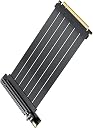
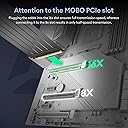
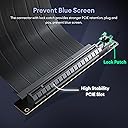
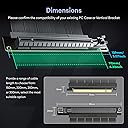
The Okinos PCI-E 4.0 Riser Cable delivers ultra-fast 16 GT/s data transfer, compatible with top-tier GPUs like RTX4090 and RX7900XTX. Its 150mm ultra-flexible, foldable design enables superior cable management, while 15mm elliptical screw holes provide enhanced mounting stability. Gold-plated pins and a 90-degree connector ensure durable, reliable performance for high-end gaming and professional builds.



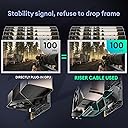
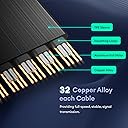
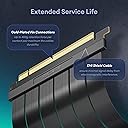


| ASIN | B0CNNJHK93 |
| Best Sellers Rank | #8,409 in Computer Internal Components |
| Brand | Okinos |
| Brand Name | Okinos |
| Cable Type | PCI-E |
| Color | Black |
| Compatible Devices | RTX4070 Super, RTX4080, RTX4090, RX7900 GRE, RX7900 XT, RX7900XTX |
| Compatible Phone Models | No Compatible Phone Models |
| Connector Gender | Male-to-Female |
| Connector Type | Pcie |
| Customer Reviews | 4.4 out of 5 stars 288 Reviews |
| Data Transfer Rate | 16 gigabits_per_second |
| Frequency | 16 GHz |
| Indoor Outdoor Usage | Indoor |
| Item Length | 15 centimeters |
| Manufacturer | Okinos |
| Model | OKINOS_PCIE4_RISER |
| Number of Items | 1 |
| Number of Pins | 16 |
| Other Special Features of the Product | Data Transfer, High Speed |
| Part Number | OKIGPUA-RC40-B1590 |
| Recommended Uses For Product | Connecting high-performance GPUs to the motherboard |
| Special Feature | Data Transfer, High Speed |
| Specification Met | RoHS |
| Warranty Description | 2 year manufacturer |
A**U
Great GPU cable for vertical mounting
I built a gaming computer with the ASUS TUF Gaming GT-502 case. This case allows for vertical mounting of my RTX 4090 GPU. This GPU interface cable works great in my system. Some tips about using the cable, the cable is quite stiff and the cable needs to be in an “S” shape to work I.e., one end plugs into the PCIe slot on the motherboard and the other right angle female PCIe connector for the GPU. So what I did was to “train” the cable to be that “S” shape by folding the cable in “S” shape and put it into a 4” diameter round jar for a few days. After a few days the cable took on that “S” shape and it would not work itself loose from the motherboard or GPU.
O**I
Worked without any technical issues. Stiff so take your time during the install
One of the budget options but riser cables don't need to be $60. It works well. Despite having to remove my GPU several times since the build to upgrade my WiFi NIC and to reroute power cables etc. Kinda stiff but be gentle and take your time and you can curve it to your needs. Install was quick, it worked well with my mobo, case, and GPU. Takes up a bit of room so if you have other PCI cards like me, it can cause headaches but again, be gentle and route it and hold it for it to kinda retain the shape and it'll work. Only gen 4 PCI-E, but that's good enough for me. Not gen 5 compatible so if your chasing those 1% lows, don't go vertically mounting the GPU.
I**O
I liked it.
1st I ordered the 200mm cable, but I found to my surprise that the cable is more sturdier than I thought, which I really liked. But for that reason, it might interfere with the installation if the GC is too close to the motherboard. I ordered the 150mm version and that fitted perfectly. Here it depeds on the build. The case, and the dimensions on how far the graphics card is from the mother board. The pictures on the description give a good match on selecting the right lenght. I did not pay good attention to that or did not give it enough veracity, but after my experience they make sense. There had not been any issues with the connection so far. It worked flawlessly the 1st time. Makklong sure both retainers on the motherboard and the riser cable are engaged. The picture of my computer is a TUF GC502.
D**.
good price
very good riser cable works perfectly for 2080 super
M**Z
No performance impact
Tested on my 3060 12gb version on pcie gen 4 motherboard. I used 3D Mark, F1 22 Benchmark, Monster Hunter Wilds Benchmark, and Cinebench. I ran all the benchmarks mentioned and recorded and average then redid the benchmarks with the riser cable. Before and after results were very close and within a margin of error. No stuttering, visual issues, thermal issues, or clock speeds were affected. Thermals are more dependent on your case so make sure you have plenty of space. Something to make sure of before buying like in the picture attached, you can see I had to swap out my braided gpu cable for the stock psu one because it would not bend well and get stuck between my large air cooler.
E**N
Don’t buy cheap riser cables
Ever since using this cable, my PC would crash randomly, games couldn’t run for more than 5min without crashing or hanging the entire computer, 1 of my 3 GPU fans would not turn on.. it was clearly causing power and communication issues between my GPU and motherboard. After removing this cable and having my GPU back into the motherboard directly for 2 weeks, not a single issue.
R**N
Double check your dimensions, it didn't fit my case.
The Okinos PCI-E 4.0 Riser Cable worked well and handled my 4090 Founders Edition without any issues. Performance-wise, it does what it’s supposed to, and the high-speed transfer and flexibility are solid. It was simple and easy to install, had a standard weight. Its also definitely durable even with zip ties. But it didn't fit perfectly. Even though the specs indicated it would fit my PC case, it didn’t quite line up as expected. I ended up using zip ties as a quick and temporary fix, which worked well enough for the time being. It’s not the most ideal solution, but it’s functional until I find something more permanent. Overall, it’s a good product, but double-check the fit for your specific case before buying.
A**R
Pretty much perfect
Very easy to use and install, looks muted and subtle in a good way, and works as well as something like this can. My only gripe is that the cable is a bit short, but it's just a personal thing as the riser still works perfectly fine.
Trustpilot
2 days ago
3 weeks ago