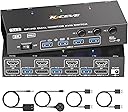


KVM Switch 2 Monitors 3 Computers HDMI Dispalyport 8K@60Hz 4K144Hz
Product ID: 806549127
Details
- BrandNAWEN
- Connector TypePlug In
- Contact TypeNormally
- Current Rating1 A
- Item dimensions L x W x H3.94 x 2.76 x
- MaterialMetal
Desertcart purchases this item on your behalf and handles shipping, customs, and support to South Korea.
Buy NAWEN KVM Switch 2 Monitors 3 Computers HDMI Dispalyport 8K@60Hz 4K144Hz | USB3.0 KVM Switch Dual Monitor for 3 PC Share 4 USB 3.0 Devices and 2 Screens, with 3 USB Cables and Wired Remote: KVM Switches - desertcart.com ✓ FREE DELIVERY possible on eligible purchases Review: Works great! - I don't know why it took me so long to get a KVM switch. With my 2 work laptops and personal desktop, it's sooo much easier to switch computers. Works great with all 3 and 2 monitors. I have Windows only OS, so not sure how it would do with a MAC. Review: Convenient for Multiple Computers - This KVM switch is a great solution for managing multiple computers with two monitors. It makes switching between three computers much more convenient without constantly unplugging cables. The setup is fairly straightforward, and it helps keep my desk more organized. Overall, a useful device for a multi-computer workspace
| ASIN | B0FX2T4BBV |
| Best Sellers Rank | #784 in KVM Switches |
| Brand | NAWEN |
| Brand Name | NAWEN |
| Circuit Type | 1-way |
| Color | black |
| Compatible Devices | Computers/Laptops with HDMI or DisplayPort and USB 3.0 devices |
| Connectivity Protocol | HDMI, DP |
| Connector Type | Plug In |
| Contact Material | Brass |
| Contact Type | Normally Closed |
| Control Method | Push Button, Remote |
| Control Type | remote |
| Current Rating | 1 A |
| Customer Reviews | 3.9 out of 5 stars 7 Reviews |
| Included Components | KVM |
| International Protection Rating | IP00 |
| Item Dimensions | 3.94 x 2.76 x 0.79 inches |
| Lower Temperature Rating | 50 °C |
| Manufacturer | NAWEN |
| Material Type | Metal |
| Model | NW-KVM302DH |
| Mounting Type | PCB Mount |
| Operating Voltage | 5 volts |
| Operation Mode | OFF-NONE-ON |
| Part Number | NW-KVM302DH |
| Specification Met | CCC |
| Switch Type | DIP Switch |
| Terminal | Solder |
| UPC | 612715348355 |
| Unit Count | 650 Count |
| Upper Temperature Rating | 50 °C |
B**N
Works great!
I don't know why it took me so long to get a KVM switch. With my 2 work laptops and personal desktop, it's sooo much easier to switch computers. Works great with all 3 and 2 monitors. I have Windows only OS, so not sure how it would do with a MAC.
Y**A
Convenient for Multiple Computers
This KVM switch is a great solution for managing multiple computers with two monitors. It makes switching between three computers much more convenient without constantly unplugging cables. The setup is fairly straightforward, and it helps keep my desk more organized. Overall, a useful device for a multi-computer workspace
P**H
Certified Tech Review: Lasted less than six months under light use. Very janky.
I am a certified computer tech with KVM experience. I have three computers and I am trying to use the same keyboard, mouse and monitor for them. This device is not having any trouble switching between the single monitor, however the keyboard and mouse only work on one computer. That means the USB ports are working on the front of this KVM, but only on PC1. When I switch to PC2 or PC3 the keyboard and mouse will not work. If I unplug the keyboard and mouse from the KVM and plug them in directly to either of the other PC's the keyboard and mouse work. The worst part is, that this was not an issue when I first hooked it up. So it seems like this device lasted four or five months.
J**R
Not adequate for my gaming needs - but excellent customer service.
Works at basic tasks, just sharing screens and inputs, so it gets 2 stars. However, when using it for gaming, it apparently can't handle the throughput. Despite buying the model that claims it can handle 8k@60hz and 4k@144hz, it shorts out if I push anything higher than 4k@60hz, resulting in a black screen every few seconds before coming back. When connecting directly to the monitor from PC, bypassing the switch, there are absolutely zero issues, even at 4k@167 hz, proving the switch is the problem. Edit: After posting the original 2 star review, the seller reached out to me and suggested multiple options to try and correct the issues I was having. While they were ultimately unsuccessful, I truly appreciated how much they cared about my experience. After discussion with them, it appears that the switch can do what they advertise, but not if you also are using HDR on your system. Apparently, the bandwidth for gaming in 4k@144Hz with HDR enabled is just too much during for the switch to handle. With HDR off it did seem to do better, but still wasn't good enough for my needs. However, if you don't need to handle that high of output or are comfortable turning off HDR, it works quite well. Because of the excellent customer service, I raised my review to 3 stars.
Trustpilot
2 weeks ago
2 days ago