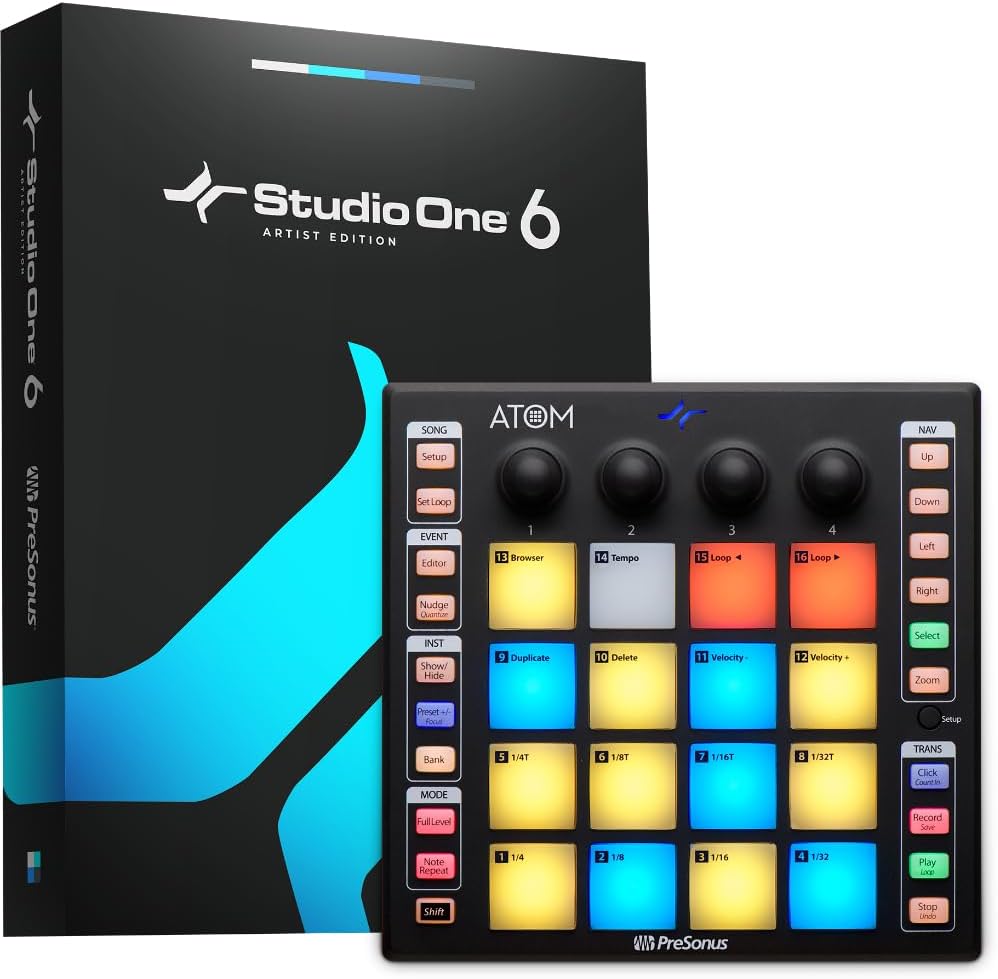
🎶 Unlock your beat-making genius with ATOM — where pro control meets instant inspiration!
The PreSonus ATOM is a compact, USB-powered MIDI pad controller featuring 16 velocity- and pressure-sensitive RGB pads, 20 assignable buttons, and 4 rotary encoders. It integrates tightly with Studio One Artist and Ableton Live Lite software, providing a seamless production and performance experience. Bundled with over $1000 in software plugins and curated loops, ATOM offers professional-grade tools for music producers on Windows, macOS, iOS, and Android platforms.


| ASIN | B07H6BVHSV |
| Best Sellers Rank | #10,187 in Musical Instruments ( See Top 100 in Musical Instruments ) #47 in Computer Recording MIDI Controllers |
| Color Name | Black |
| Compatible Devices | Laptop, Desktop, Tablet, Smartphone (Windows, Mac, iOS, Android) via USB |
| Connector Type | USB |
| Customer Reviews | 4.4 4.4 out of 5 stars (1,255) |
| Date First Available | September 10, 2018 |
| Hardware Interface | USB 2.0 |
| Hardware Platform | PC/Mac, iOS, Android |
| Instrument Key | Any |
| Is Discontinued By Manufacturer | No |
| Item Weight | 1 pounds |
| Item model number | ATOM |
| Material Type | Stainless Steel |
| Musical Style | Electronic |
| Product Dimensions | 14 x 11 x 6 inches |
| Size | 0 |
| Supported Software | Ableton Live |
K**R
Surprisingly easy to use for music production.
I needed something tactile to allow me to produce a little more specific (rather than just using a mouse to point and click out beats). This thing is solid, feels significant and was surprisingly simple to figure out and start using. It connected to my Studio One 6 software without a hitch and, once you begin learning the little ins and outs of the button functionality, it is full steam ahead! Very cool item for music production and even streaming (it has six programmable sound banks). All in all, well worth the money and fun as all heck to use!
R**A
This Pad Was Made To Beat
Atom is a Presonus Midi controler pad-input instrument, so it's primary usage is with Studio One sequencer basied software, (Lite, but substantial version INCLUDED). However, you can also use it with other packages like Ableton Live. I'm using it as an iOS (iPad) Midi instrument input (running Loopy Pro). It's a sturdy 16 pad/4 Variable knobs controller, that's 8 inches square. It communicates it's status by turning the pads different colors, while this varies with different software. I believe a lot of people use it as a virtual drum machine input but you can use it as MIDI program change or music notes controller for any midi device. That means you can control changing actually notes, voices or loops in the software (that responds to Midi). It uses AND INCLUDES a USB-B cable, and it's powered by THAT cable. Unless you power that setup it will draw it's power from the device you connect it to and possible shorten the battery run time. If you use with a device that doesn't connect to the USB-A end, you'll need an adapter. If you're using an iPad, get a adapter that's certified to work by Apple. Also, those adapters that have a way to power the unit or the system. The pads on the Atom are a good quality, they feel a little stiff but respond well. They include variable velocity outputs. If you're using an iOS device a lot of the apps can show you the Midi numbers of each pad so you can program accordingly to what ever you're connecting to - using ' Midi Learn' function. Compared to other similar devices, it does well but cost less than most. Other more expensive controllers have more pads, but I don't see the need for them in my set up. Your's may be different.
T**S
I Like The ATOM!
The PreSonus ATOM is the first MIDI pad controller I've ever used and it took me a few YouTube tutorials and 3 days to get through the learning curve but once I did, I found the ATOM to be relatively EASY to use! With it, I can turn an idea to a full song QUICKLY and arrange and edit on the fly. I like that it's fully integrated with Studio One 4. Just download the software and link up with the Universal Controller (found at the PreSonus website) and you're done. The pads are multi-functional and assignable - I can create my own template. The touch response is great and the colors are bright. I find the functions quite user-friendly. From the unit I can open a track, assign an instrument, record it, loop it, set the tempo, duplicate or delete it, quantize it and more - all without touching the mouse! I really like that I can use my M-Audio Oxygen 25 keyboard with it too. It's compatible! Once I learned the ATOM, it quickly became my new sidekick in the studio. This also comes with Studio One 4 Artist (which I use) and LOTS of high-quality kits and samples by MVP Loops. I highly recommend getting the ATOM/Studio One 4/Interface/Mic bundle.
J**H
Most affordable & capable interface for Studio One you'll find
The material might feel a little cheap, & I wish the entire thing were white, instead of only the bottom piece, but you won't find as much bang for your buck anywhere else. When it comes to Studio One integration it's flawless, although S1 is the most stable DAW out there when it comes to device integration. I believe this comes with a copy of S1 Artist, but it's very limited compared to the professional S1, which you can upgrade to from this for only $299, which is the absolute best price you find anywhere on any pro DAW, but it's also one of the very best DAWs. The workflow is amazing.
C**F
Great controller for StudioOne
I have different music software and hardware but for Studio One, this is the best choice. If you plan to not use the mouse much, and rely on a single device to make music and also control the software, this one get pretty close to that. Pros: it is very integrated with Studio One of course, so you can expect a lot of facilities and shortcuts. It is not that hard to remember what everything does, even if you have a couple of features per control. On the cons side, it is not that useful beyond Studio One, as there is no clear way to set up what each control does, like you can do with a Maschine Mikro for example; so you are stuck with whatever CC was set for the controls. If that is not a problem, the pads are great for finger drumming and overall it can be used as drumpad device and companion to a standard keyboard. I use it also in Cubase and Ableton and it works to an extent, but as mentioned, you won't be able to do any advanced operation unless you use Studio One.
T**9
Look, I'm a drummer!!! Kinda, sorta!
I bought this to create drum tracks in Pro Tools but it would not work. I didn't want the other version of this pad although I've heard it's better. I tried this with Pro Studio One and it works excellent. It was seamless and I have been using it to lay down drum tracks for some songs that I've been putting together. I think it sounds great. For the money I'd say it's excellent. It has pressure sensitive pads and is programmable. It may not be the absolute best out there, but I'm happy with it so far. I'm a string player and I've never been able to play drums. This is about the closest I'll ever come. Lol.... So far it's all good!
P**L
If you're lucky enough to find the ATOM in stock, buy it. It's a solid piece of hardware, no setup required and is very tightly integrated with S1. It's small enough to fit into my backpack with my laptop when I go mobile and packed with enough features that I can work on the go. Pros: - Well priced - Solid construction and very compact - Pads, buttons and rotary encoders feel great and are very responsive - Very tight integration with Studio One - Greatly improves workflow in S1 - Comes with Studio One 4 Artist Version and Impact XT Sample pack (these alone are worth the purchase) Cons: - No power switch so pads stay lit up when computer is off and it's bright enough to light up a room - Out of the box functionality with other DAWs is limited
S**A
Negative: I ordered an item and i realized some pads are not working and over sensitive and some pads are triggered even when i press bank, like other push buttons. updated firmware and still it didnt resolve the problem. i checked the manuafacture date and it was 21XX something means made in 2021 even now it is 2024. i have requested a return and i received a new item within a one working day. The new item was manufactured in 2023 and the above mentioned problem was not there.. Possitive: i am fully satisfied with the all features and usability and workflow. Now i am using this even in my mixing sessions as well :) :) i use these knobs to control third party plugins. ex: compressor threshould, gain, mix like most comonly used controlls. smooth and works with almost all third party plugins. feeling of pads are also great and fun to play..
J**Y
Having gone through Maschine Studio and Mikros in use within Studio One now very happy with the Atom NI changes were annoying however still use Battery and Komplete and Maschine software if necessary but find the Atom much more easier. Solid build quality and prefer its format. Absolute recommendation for S1 users and great for a new user who does not have a daw yet. Although the artist license is naff for anybody already using S1 Right now the Pro upgrade is £99 at Scan making this an absolute no brainer if you do not have Studio One 4 and want to step into it.
G**Z
Me gustó mucho el tamaño y la sensibilidad de los pads. Viene con gran cantidad de plugins.
B**G
Pour une fois le Fabricant tient ses promesses . Car si le produit est beau et fonctionne super bien , il y a la suite logistique promise ! Il faut un peu de patience et ouvrir un compte , puis attendre un peu pour que la validation du produit arrive et enfin ...la page de téléchargement des softs soit possible . Mais ça marche ! et retrouver Ableton Live gratos c'est de la balle !!! Studio One 5 est un énorme outils avec une visibilité directe sur la . tablette Atom , qui prend en compte nos dossiers perso sans aucune difficulté pour les simpler . Merci à PreSonus
Trustpilot
5 days ago
1 month ago