Desertcart purchases this item on your behalf and handles shipping, customs, and support to South Korea.
🔐 Elevate your entry game—smart security that welcomes you home effortlessly.
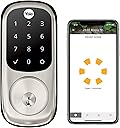
The Yale Assure Lock Touchscreen Deadbolt combines advanced keyless technology with Wi-Fi and Bluetooth connectivity, enabling remote access and real-time monitoring through the Yale Access App. Featuring auto-lock/unlock, voice assistant compatibility, and a backlit touchscreen keypad, it offers both convenience and security. Designed for easy installation and backed by a lifetime limited mechanical warranty, this satin nickel smart lock is perfect for modern homes seeking seamless, reliable access control.


| ASIN | B07GQ372JP |
| Additional Features | Auto Unlock, Auto-Lock, Back-Lit Keypad, Keyless, Passcode Unlock |
| Best Sellers Rank | #108,672 in Tools & Home Improvement ( See Top 100 in Tools & Home Improvement ) #394 in Deadbolts |
| Brand | Yale |
| Brand Name | Yale |
| Color | Satin Nickel |
| Connectivity Protocol | Bluetooth, Wi-Fi |
| Control Method | App |
| Controller Type | Amazon Echo, Apple HomeKit, Google Assistant, SmartThings, Vera |
| Customer Reviews | 3.9 out of 5 stars 2,514 Reviews |
| Finish Types | Brushed |
| Global Trade Identification Number | 00081023044660 |
| Included Components | Yale Assure Lock Touhcscreen, Connected by August Module, August Connect Wi-Fi Bridge, August DoorSense, Deadbolt, Strike Plate, Mounting Hardware, Installation Manual, 2 keys |
| Item Dimensions | 1.38 x 2.75 x 6.06 inches |
| Item Type Name | Smart Lock |
| Item Weight | 4.5 pounds |
| Item dimensions L x W x H | 1.38 x 2.75 x 6.06 inches |
| Lock Type | Biometric, Keypad |
| Manufacturer | Yale |
| Manufacturer Part Number | YRD226-CBA-619 |
| Manufacturer Warranty Description | Lifetime limited warranty on Finish and Mechanical. One year on Electronics |
| Material | Metal |
| Material Type | Metal |
| Model Name | Yale Assure |
| Model Number | YRD226-CBA-619 |
| Number of Items | 1 |
| Number of Packs | 1 |
| Number of Pieces | 2 |
| Recommended Uses For Product | Door |
| Shape | Rectangular |
| Special Feature | Auto Unlock, Auto-Lock , Back-Lit Keypad, Keyless, Passcode Unlock |
| Style Name | Touchscreen - With Key |
| UPC | 081023044660 |
| Unit Count | 1 Count |
E**N
Required some troubleshooting, but works great!
Overall, I'd highly recommend. I went with the "keypad + key" option as I live in a condo with only one entrance, and I don't trust anything electronic 100%. This way I can keep a key in my car, just in case. The hardware part of the installation was simple enough; luckily all the dimensions on my door and doorframe were within tolerances. The only surgery was drilling a 5/8" hole in the doorframe to place the included magnet (which allows the lock to know when the door is closed, enabling features that depend on that). They also give you the option to glue this magnet to the interior face of the doorframe, if you don't want to drill (but it'll be visible). Or you can omit it entirely. The software part didn't go 100% smoothly, but it was *much* better than I'd expected. I followed the included directions which tell you to put everything together and set a master code on the keypad. I then installed the Yale app and attempted to link my lock, but got a message stating that the lock was already registered and the current owner would have to give permission to allow a factory reset. Weird, as I bought it new, but I clicked "OK". I was then prompted to scan a QR code, and received another error stating that it didn't match the lock's serial number--which was bogus. I decided to do a factory reset and try the in-app setup first (before setting a master code) and this did the trick, so it seems you need to do things in that order--but the instructions don't state this, and the app was giving odd/incorrect feedback. Another point of confusion is whether to have the 'smart' module plugged-in when you remove/insert batteries. It seems to differ based on exactly what you're trying to do. I eventually got it all set up, though. I also had a minor issue with placing the WiFi bridge module. I have an outlet that I *thought* was ideally placed: it's on the same wall as the door, only about four feet away. It's also unused and hidden behind furniture, so perfect for my purposes. Unfortunately, I could not get the bridge to connect to my WiFi from this spot. When I moved it to the other side of the room, it connected up just fine. I thought this was strange, as it's only about a 15' difference and there are no additional obstructions besides a cheap couch--which 2.5GHz should zip right through. Who knows? With everything working, I'm very satisfied. Auto-unlock (when my phone gets in range) works superbly, and I like that I can set it to automatically lock as well. The app is reasonably intuitive and stable. All in all, it's the right combination of features and it's nicely executed.
S**M
The best digital door lock on the market IMHO
I purchased this digital door lock because it was the only one on the market that has all the following: 1) Has a key backup (electronics can fail and being the only entrance to my condo I couldn't afford to risk not being able to get in. If you have a house with an alternate door you could risk going completely keyless) 2) Automatic lock and un-lock functionality based on my phone presence (This lock excels at this. Just need Bluetooth turned on, which it is for my car anyway. Don't need the application opened up. I just close the door and it auto locks and when I arrive home the door auto unlocks as I just get near it. No need to pull my phone out of my pocket or worry about having the application running. It's really that easy) 3) Wi-Fi connectivity (allows me to be notified of anyone entering or exiting my condo as I've given access to neighbors for use in case of emergency. I can also let a repairman in when they call just by clicking a button in the application in my phone) 4) Keypad for people to enter code to enter (either permanent or temporarily) 5) Not too obnoxious looking for a dual electronic/key lock. Others are too industrial or just plain ugly. I see others have stated things along the lines of it doesn't work or its broken. I had one problem that was self-inflicted. After installation things didn't seem to work consistently. While I could lock the door with a key, the auto lock and un-lock were unrealiable. I also noticed that the privacy button wouldn't work. After investigating I realized the deadbolt couldn't extend fully as the existing opening in the door jam was about 1/8 inch too shallow to allow such. As soon as I chisled it out everything worked perfectly. This is one area that Yale could have improved the troubleshooting on. While it loves to talk and tell you what it's status is (I turned this off in the advanced settings as it is annoying after the first time), it won't tell you anything is wrong, it just doesn't work reliably. The only other item that may turn people off is that you have a 'jumper' plugged into an electrical wall outlet to manage the lock via Wi-Fi/Internet. But this is common across the industry as Bluetooth is energy efficient and Wi-Fi is not. Just imagine either running electricity to your door or replacing the batteries every day. No thanks, a small jumper device is the best solution for the time being. I've been using this for 3 months now and couldn't be happier. Haven't had replaced the batteries yet. I'd definitely purchase again. Not that the key that comes with it is a Kwikset (KW1) and can easily be changed by your local locksmith.
W**F
Bad lock and unhelpful app
UPDATE: After about 18 months of use, I'm downgrading my review from two stars to one. In addition to all the aforementioned problems (door jamming constantly and grossly unreliable app), my lock has recently decided to drain the batteries at an alarming rate for no reason. While the 4 AA batteries previously lasted 6 months, the battery life has recently decreased to 3-4 months, then 6 weeks, then less than 3 weeks. The most recent time, I didn't even get a real warning - I got a low battery indicator on the lock only hours before the entire thing died and would not work at all. It's also not easy to replace the batteries - a tiny little screw needs to be taken out to get the cover off, and the screw can only be reached by a very thin screwdriver (it's not on the surface). At this point the screw is starting to get stripped from having been blindly screwed in and unscrewed 8 times in the past 6 months so I'm about ready to throw out this $350 piece of junk and purchase a new lock entirely. It's a good thing I bought a model with a physical key because the smartlock jams at least every third time I try to unlock the door. It always locks just fine, mind you, so you'll leave and return to find yourself locked out. I have to carry around the key (defeating the purpose of a smartlock) in case it jams, and it's locked out my guests a few times. Troubleshooting has not helped. There's no noticeable friction or scraping when it's working or when it's manually locked/unlocked. How difficult would it have been to build a mechanism that doesn't arbitrarily jam on its own? The August module/app is also very basic and full of bugs. First, the module needs to be plugged in right next to the door (I happen to have an outlet 2 feet from the door but you're SOL if your outlet is, say, 5 feet away). If you're not on bluetooth (ie. standing directly in front of the door, in which case you wouldn't need the app), it's extremely slow to respond. The guest codes can't be modified once you set them, so you have to delete and set a whole new entry code (which takes several steps) if you want to make any changes to a code or access schedule. The activity feed is very buggy, doesn't record half the activity (forget about being alerted if your door's opened while you're out), and doesn't distinguish at all between different users/codes, so it's not very secure if you need to grant temporary access to delivery services, etc. And don't even bother trying to use the automatic lock/unlock feature - it will unlock your door as soon as you come within wifi range (in my case, when I'm halfway down the block) and there's no way to set it to only unlock when you actually approach your door. Unless you live in a mansion or are okay with your door spontaneously unlocking whenever you happen to pass within 100 feet, this is a useless feature. Overall, there's really no excuse for such a shoddy product at this price point. I mean, it does the job of allowing me to easily lock my door on my way out or when guests leave, and *sometimes* allows me to grant entry to guests when I'm not home. I would assume that a cheaper smartlock would accomplish the exact same things with probably a comparable failure rate, so don't think that you're getting anything extra by paying for the Yale brand or August technology. You can't possibly rely on this product for anything beyond this tiny bit of convenience - certainly not anything like a rental home.
P**M
Yale Assure Lock awesome product
Latest update, after a month the lock works perfect. 5 stars. Just one thing that does not work 100% of the time is the auto unlock but can't blame it always on the lock, it could be my wifi connection at home, or my phone not having the best signal. other than that 5 starts Update, lock is working perfectly, the auto unlock works much better, I think if there was more info on how it works, how to set it up i'm sure custmers would have less problems. with a software update I'm sure we could see the battery level. Product is great. Works amazing. Had a bit of difficulty when installing and paring the August Module. There is no way of knowing the battery level but I'm guessing when the time comes the lock will let me know the battery level is low. One more thing the auto unlock by proximity does work but maybe 50% of the times so basically is not reliable. I still give the lock 4.8 stars because it has other amazing characteristics. You can see when the door is closed, open and when is left ajar. You can set up alerts, add users with access to the app or just users with code to open the lock. In general great product.
G**G
Great lock but install instructions could be better to avoid pitfalls
I put this on a remote rental property and liked it so much that I purchased a secondo for home. The first one was flawless, but the second one I ran into strange issues. First of all, when you install the connectivity software, it displays 5 options of locks ie 2nd Generation, 3rd Generation, 4th Generation etc. But NOWHERE could I find out WHAT GENERATION was this lock!!! I figured it was the latest so I chose 4th Generation. It then gets you to scan the QR code on the lock, so I guess that is really the important part. However when I finished installing I had a weird issue, where the lock would NOT unlock and the screen showing the big circle was not filled in, just a "broken circle" with the words below in "lock/unclock". Then the lock with continually engage and make a noise every 30 seconds. I was puzzled and could not figure out what was wrong. It also would not UNLOCK using the app. Trouble shooting, I noticed that if the door was open I could unlock and lock using the phone with no issues and that the normal full filled in circle would show GREEN and RED for unlock and locked. I thought maybe the software was wrong so I reset to factory and reinstalled. Same issue. then I though maybe the "sensing" module was not set correctly and screwed around with that!!! Now Im getting REALLY frustrated cause its getting late and i cant get this to work. I look at the TROUBLE SHOOTING section and NOWHERE does it describe this problem. Finally EUREKA!!! I realize that when the door is open and it works perfectly, then compare that to the door shut and it does not.....I notice that the manual close knob is EVER SO SLIGHTLY not fully turned to the right for full lock....and I'm talking about only a 1/4" or less difference in position. So I figure out that the DEPTH of the hole for the dead BOLT to go into is SLIGHTLY not deep enough, thereby causing the lock to think that it is NOT LOCKED. HOLY COW!!!! You'd think a message would come up and tell you that, but there is NO INDICATION or any NOTES I could find describing this simple issue. So drilled it out a bit more, and BINGO!!!! Everything works like a charm. Summary, make sure your deadbolt enters the hole perfectly and completely!!! Aside from that a few minor bugs, like after the connection is made to the network it tests the signal strength and every time it comes back BAD SIGNAL. Again...figured out that the reason is, the Connectivity module is STILL RESETTING and this Test is TOO SOON...just RETEST and its good! Overall I am super impressed, I turned on the Bluetooth auto entry mode and will test that tonight, will be nice to walk up to the door and its unlocked. Still TRYING TO FIGURE OUT how to REMOTELY CHANGE/ADD/DELETE codes. I had read this can be done but have not found out how yet. Hope all this helps someone
A**N
Yale Assure Lock: Effortless Security with Smart Convenience
The Yale Assure Lock is a game-changer in home security, combining advanced technology with effortless functionality. Installation is a breeze, requiring only basic tools and a few simple steps. Once set up, the Wi-Fi connectivity opens up a world of possibilities, allowing remote access and control via the intuitive smartphone app. The touchscreen interface adds a touch of modern elegance to any door, while the keyless entry system eliminates the hassle of fumbling for keys. With customizable access codes, I can easily grant temporary or permanent access to family, friends, and service providers, all with the touch of a button. The lock's reliability is unmatched, providing peace of mind knowing that my home is securely protected around the clock. Plus, the sleek design seamlessly blends with any décor, enhancing both security and aesthetics. Overall, the Yale Assure Lock is a must-have for anyone seeking seamless integration of smart technology and home security. Its convenience, reliability, and stylish design make it a standout choice in the realm of smart locks.
J**S
Best Smart Home Door Lock
I wanted a good door lock that can connect on an APP with other devices. Installation took about 30-45 minutes. Straight forward instructions to install, but the only problem I ran into was that I had to make the hole larger for the deadbolt. I originally did not attempt to make the hole bigger, but just push the deadbolt into the hole by forcing it, but this created a large headache. I setup auto-lock and did not realize that if it cannot lock it will beep. The next day I realized this the next morning and kept hearing the lock every 30 minute interval. The mechanism cannot push the lock into the hole. I had to make the hole larger and it fixed the problem. August App: VERY Easy to setup and only took me about 10 minutes to setup. I love how I'm able to control this from anywhere around the world! I use this app all the time to unlock the door for guests if im upstairs or away from home. Overall, I would give this 5/5 stars for this great lock! I wanted a lock that still had a keyhole incase of anything fails. This was my go-to purchase out of all the smart door locks I looked into. The only downside is that it does not integrate with RING. PLEASE make your lock available to RING to sync them together!
H**A
Technical support is lacking
I have these locks installed on multiple Airbnb 300+ miles away. They are nice when they work properly as adding guest codes remotely is nice. Knowing the whether the locks are locked or unlocked provides a sense of security. Individuals traveling alone are aware they are receiving unique codes providing them with a sense of security. I have 3 smart locks on one house - the first is now an expensive deadbolt, the second is a a lever smart lock, and the 3rd lock is on a detached garage. The Yale Connect on the front door does not connect with the wifi after less than 3 months - the Connect module does not work and I no longer know the status of the door. The lock on the detached garage is so finicky, I have to notify the guests when the lock does not properly engage otherwise the batteries drain quickly. I have tried to add all 3 locks to the same location on the Yale Access app. I consistently received an error message on the Yale Access App when trying to add access codes. I called support and they stated it was an issue with the module. As a software developer, I told them this was a software issue. I could add 1 or 2 locks to a single location and it functioned properly. Adding the 3rd lock caused errors and the codes would not be added to any of the locks. I had to add the 3rd lock to a unique location. The support personal told me Yale technical support would follow up, but it would take time. It has been 2 months. Rekeying the locks is problematic as well. The local hardware stores only rekey Schlage or Kwikset. I cannot have these locks rekeyed locally. I went with the Yale because of the wifi functionality. On my personal residence, I have a Schlage smart lock. When I purchased it 3 years ago, a z-wave hub was required. After 3 years, the Schlage lock installed at my personal residence still functions properly. We seldom have the lock fail to engage properly. The situation will remain the same until I can drive up to the the homes. This is the busy season and driving 5 hours to replace a malfunctioning lock is an issue. After spending nearly $1500 on Yale locks, I won't use Yale again.
F**E
El bridge no se conecta a wifi
El bridge no se conecta, y el soporte de yale me dice que no me pueden ayudar porque la cerradura la compre en amazon, y lo tengo que ver con el vendedor. Y el vendedor no me contesta.
A**X
Look nowhere
Easy to install and works like charm. Have keys, door sense and wifi module all inclusive for a very reasonable price. Lot of functions, especially liked the autolock and door ajar warning features.
M**O
Es muy buena cerradura
Pero si tienes que tener las herramientas correctas para que el trabajo sea lo más limpio y correcto. Cabe mencionar que para la programación no es tan sencilla, hay que ser paciente y buscar, pero hasta ahora después de un mes de uso está funcionando muy bien.
S**D
Great lock
I couldn’t find the lock with the keypad and key option as well except for on American Amazon. Unfortunately that means that the bridge that comes with it for wifi is a US plug so I had to buy an adapter to plug it in. During setup was a bit of a doozy to told me that the lock was already registered to another owner, then I realised you have to scan the QR code on the bridge not the wifi module. Also registering the module prior using the keypad is important. It should be noted that the module and bridge that came with this lock are actually Yale branded and I could not get it to setup in the august app, it did work perfectly with the Yale access app. My router does pick it up as an August product so I presume august and Yale modules and bridges come from the same factory and they just brand them with which ever logo they feel like on the day. Overall my experience with this lock over two weeks since being installed is really good, I’ve had zero connectivity issues that others have mentioned. My bridge connect is right next to the door hidden inside a wooden bench seat. The app is flawless, have assigned access codes to 10 different people and the activity log and ability to lock and unlock remotely is amazing. The lock looks really smart on the wooden door with matching black handle. Definitely the nicest looking smart lock I’ve come across.
M**A
No sirve y el vendedor no responde
El número de serie y módulo nunca funcionó. Adicional a esto se contactó al vendedor para factura y nunca respondió
Trustpilot
2 weeks ago
2 months ago