⚡ Power Your Data, Protect Your Drive — RAID Ready, Travel Steady!
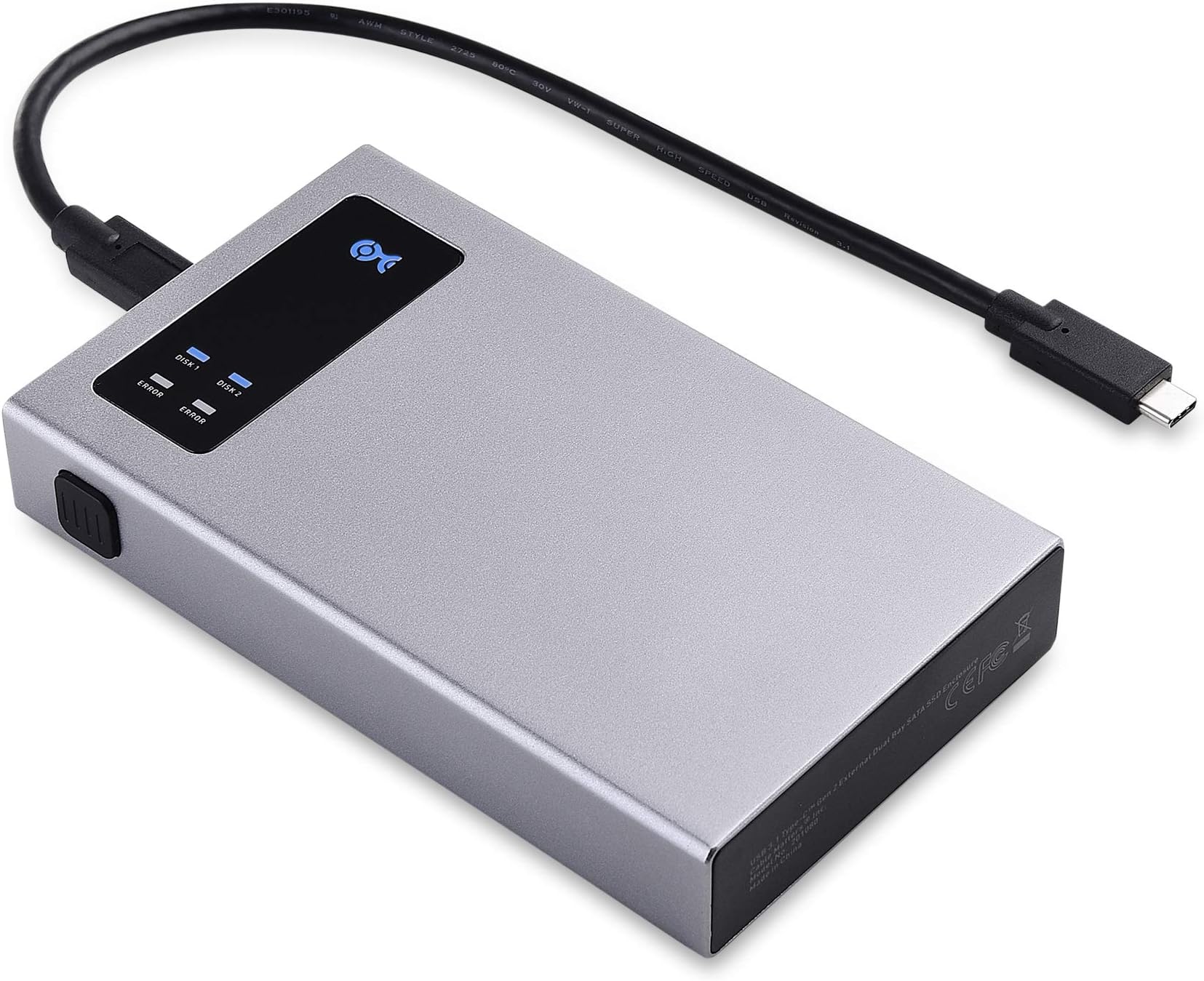
The Cable Matters 10Gbps Aluminum Dual Bay 2.5 Inch External SSD Enclosure is a professional-grade storage solution designed for millennial managers who demand speed, flexibility, and reliability. Supporting two SATA SSDs with RAID 0/1 and JBOD configurations, it delivers up to 10Gbps transfer speeds via USB-C, USB-A, and Thunderbolt ports. Its tool-less, compact aluminum design ensures quick setup and portability, while smart cooling and optional supplemental power keep your data safe and accessible anywhere. Compatible with both Mac and Windows, this enclosure is the ultimate upgrade for fast, secure external storage.



| ASIN | B07CQ6C4MW |
| Best Sellers Rank | #3,462 in Enclosures |
| Brand | Cable Matters |
| Compatible Devices | Laptop |
| Connectivity Technology | USB, Thunderbolt |
| Customer Reviews | 4.3 out of 5 stars 290 Reviews |
| Data Transfer Rate | 10 Gigabits Per Second |
| Enclosure Material | Aluminum |
| Hard Disk Form Factor | 2.5 Inches |
| Hardware Interface | USB |
| Hardware Platform | Sata |
| Item Dimensions L x W x H | 2.75"L x 2.5"W x 0.28"H |
| Manufacturer | Cable Matters |
| Material | Aluminum |
| Mfr Part Number | 201080-BLK |
| Model Number | 201080-BLK |
| Product Dimensions | 2.75"L x 2.5"W x 0.28"H |
| Supported Devices Quantity | 2 |
| UPC | 818707023556 |
| Unit Count | 2.0 Count |
R**.
Great Portable Enclosure -- It Just Works (and Works Well)
I love this thing: It was was crazy easy to set up and has been rock solid for my scenario (though for just a few days so far). I will update this review if I start having problems in the next few weeks. (While I don't doubt the various trouble scenarios others have described, those troublesome reports evidently do not match my own use case.) I wanted a compact external enclosure capable to use with a laptop while travelling away from home. The enclosure needs to be capable of RAID 0, RAID 1, and JBOD. I am using a pair of Samsung QVO 4TB SSDs. The laptop I'm using has a USB 3.1 port with USB-C connector. Finally, I want an easy-to-find interface / cable for supplemental power, in case I need it but can't easily and quickly get the most up-to-date gear. Installation and Configuration: It took maybe five minutes to install SSDs and configure the device. Installing the drives can be tool-less, but screws and a small Phillips-head screwdriver are enclosed for attaching the drives to the enclosure tray. (I used the screws.) DIP-switch configuration is easily accessible on the drive tray, with the various options clearly labelled (JBOD, RAID 0, RAID 1, or "Big"). Once the drives are in and DIP switches set, plug the device in to the laptop for power and then use a paper clip to press the recessed 'reset' button. (Note: It seems like pressing the 'reset' button will reconfigure and delete all data no matter which option you select. You've been warned!) Finally, partition and format the drive (or drives) using your operating system. In five minutes the device is up and running; no muss, no fuss, no bother. Now for Performance: In my scenario, the device gets plenty of power and works reliably on bus power from my laptop's USB-C port using only the enclosed short USB-C cable. (As I write this, the device has been continuously writing and reading data for over 24 hours with no glitches or errors were encountered. I even physically moved the enclosure around while it was working to test the connections using the enclosed USB cable; no issues encountered.) The device behaves and performs as expected in all modes: Using CrystalDriveMark, I get nearly the full rated read and write speed from both SSDs (configured as JBOD). I get nearly that speed in RAID 1 and almost double speed reading when configured as RAID 0. As expected, the onboard RAID controller does impose a performance cost when writing in either RAID mode. The RAID controller is built-in; no drivers or added software is needed. The enclosure passes full SMART data for all enclosed drives -- both CrystalDriveInfo and HD Sentinel show all expected info from both drives in all modes (JBOD, "Big," or either RAID setting). Cooling is good enough: While in continuous use for over 24 hours (downloading software and data), both installed drives report temperatures holding between 45 and 50 degrees C. The box itself is warm but not hot to the touch. The device also seems to get plenty of power from a generic Apple USB power plug (from an older iPad) and a random micro-USB cable from the drug store. I tested this while accessing the device on an old desktop system through a USB 2.0 port (but I didn't stress test it with hard reads and writes; your mileage could vary). I am happy this device uses the ubiquitous micro-USB for supplemental power; you can easily get those cables and a matching power plug at a corner shop, drug store, or gas station in any town pretty much anywhere in the world, no matter how small and off the beaten path.
C**.
Good Product — Yes it’s SSD-Only
I have this set up with two Samsung 860 Evo SSDs. It’s currently in RAID 0 and scoring about 875MB/ second in BM for both reads and writes. I copied a 675GB folder from another drive in 12:30. I haven’t decided whether I’ll live it up with the RAID speeds or play it safe in a BIG configuration. Connected to my iMac Pro, the enclosure is recognized immediately— there are no hurdles to formatting and no drivers required. Because one of my two drives was previously formatted, I needed to use a paper clip to hit the “reset” button which erases both drives and presents them properly. Installation was toolless and simple. The device is powered by the single (short) USB-C cable, and the DIP switches are easy enough to access but are inside the case so you can’t change them inadvertently. It’s worth mentioning that my iMac forcibly ejected the drive whenever it went to sleep. That’s disappointing, but disabling “put hard drives to sleep” in settings fixed this. Looks-wise it’s pretty good. It’s about the same dark grey color as my Mac and the blue leds don’t face me. The FCC fine print is all facing out at you, though, and with the cables on the other side there’s no real way to hide them. Ultimately I forget it’s there. Barring some sort of electronics failure, I would recommend this device. It’s cheap, easy to set up and performs well.
K**J
Well-built, works great, one dud
First, the speeds with two WD Blue 5400 RPM 1TB drives, each with an individual max read/write speed of ~125/100 MB/s: JBOD: 123 / 93 RAID0: 176 / 159 RAID1: 123 / 83 Write speed for a 100GB file in RAID1 averaged 110MB/s, which is fantastic. RAID 1 speeds could be better, but in general the overhead from the SATA RAID controller is very minimal. I bought this for redundancy, and honestly if you are looking for insane speeds, you're better off saving money on the 2nd 2.5" drive and using an m.2 enclosure with a much faster NVMe SSD. Build quality, materials, etc. are all great, and the unit feels very high quality. It's easy to set up and configure the RAID mode using the small switches and the reset button. -1 star for the first unit, which was a dud, but +1 star for the great CM customer support that had a replacement sent out straight away. I've always been happy with CM products so this is a safe buy. Individual HDD enclosures are about $10, so at $40 you are paying roughly $20 for RAID. Could be cheaper but I'm happy with it.
A**.
1st one lasted < 24 hours. Second one lasted 40 days, you know, a little past the return date!
Like the size, the stand and the fact that external power can be applied. Comes with a nice little stand that you may want to use. It does not come with an external power supply (any USB 5v power cube should do) nor a power cable (power cube ... usually USB-A ... to USB-C). Easy to set up as the drive holder just slides out to the case. It comes with a small screwdriver and screws to hold the two SSD's in place, then just slides back into the case. First one lasted less than 24 hours. Got is set up as JBOD and then let Time Machine work overnight to backup a Mac Ultra Studio. Next morning the power light was on but no connectivity. Removed both drives and put each of them into a SATA to USB-A adapter I had lying around. Both drives were fine (not bricked ... a positive I guess). Put the drives back in to the Cable Matters device and no joy. Kudo's to the Amazon return process as I filled out the return into, put everything back in the box and dropped the box off at the UPS store. In the mean time Amazon started the process to send a new one. Arrived in two days. So two stars as the new one has survived for at least one night (yes, a very low bar), and I will update as time goes one. Update: The second one has been trouble free. Would have been a 5 star review based on everything else being as good as it was, but having to procure two to get one great one cost it a star. Update again: The second one just died. The blue power lights work fine but no drive activity. Tried a different USB-C cable and still no joy. Removed the SSD's from the case and used a SATA to USB-C adapter and the drives mount with no problems. I'm in search of something in this form factor but that has electronics that last more than 45 days!! Update, yet again: I contacted Cable Matters Support and after sever emails back and forth to ensure it was the enclosure and not either of my Mac's, any of my cables or any of my power supplies they sent me a third enclosure and a USPS return label to use to sent the other one back to them, not to Amazon. I expected the 'it must be something else so lets replace everything, including the SSD's, the cables, the power supplies, the Mac's, etc. before we think it is our product incantation', but they were pretty nice about it and we eventually arrived and the correct conclusion and replacement actions. Hopefully this will be the last update. As mentioned, I like the form factor and the fact that it holds 2 SSD's ... perfect for the "dual drive Time Machine support but only ties up 1 USB-C port" I was looking for.
T**N
Acceptable performance, perhaps some thermal throttling issues
Overall happy with this device, it’s bus powered (fantastic), and delivers respectable performance that may be limited by the drives I chose. Being price conscious, I have two 4TB WD Blue SATA3 SSDs in here, with performance hitting 900 MB/s read/write in only the best case scenarios. The performance varies a few hundred MB/s when doing large writes. This may be a limitation of the ASMedia controller, or the performance of these underwhelming SSDs, or thermal throttling due to the size of the enclosure. The enclosure is the smallest size one could envision for a dual 2.5” array, which is fantastic for portability (along with it being bus-powered), but doesn’t necessarily have the best thermal protection for the drives under load. The controller is an ASMedia asm1352r-fast, and this product is a white-label product that is purchased by both Cable Matters and Inateck. Inateck calls it the FE2101. Check for listings of both, as the price may be better for one or the other, and they are identical. Inateck does provide a longer USB-C cable, but charges more.
J**P
Overall good for me, but has issues.
Overall good for me, but has issues. For those that think this enclosure is killing their drives, you might be experiencing a common issue that can happen to SSD’s that experience sudden power loss. Please try the following: Connect the SSD to power only, not data. Alternatively, entering bios and letting it sit there may also work instead. 1. Turn on the power and leave the power on for 30 minutes. 2. After 30 minutes, power down or pull the power cable. 3. Wait 30 seconds, then restore power. Let the drive sit powered on for another 30 minutes. 4. Power down again, then wait 30 seconds. You can search for “SSD power cycle” for more info. I’ve had to do with with a few Samsung nvme and sata drives after a power loss event or experiments with other enclosures. Connecting and powering drives over USB seems to also bring out these kind of issues. Intel drives seem more resistant to this kind of failure, though I can’t say for certain. The first issue is I suspect there are thermal issues with the controller in the enclosure. I would initially get freezes every few weeks, especially when I was moving larger amounts of data, the unit would suddenly disconnect. I have a box of various sized small aluminum heat sinks with adhesive on them. Opening the unit up and putting one of those on the controller resulted in no further issues. Trying to “recover” from such a disconnect was also especially problematic without a clear way to identify or resolve what was wrong. Problems could also show up switching between systems. After a crash or system switch, sometimes the unit wouldn’t come online, maby flashing the red leds and doing nothing else. After randomly messing around, I was eventually able to bring it back, without a clear idea of what worked. My unit has been stable for months nows after the heatsink fix, but recently a windows update caused issues, and I had to force shutdown the system. This resulted in another occurrence of device not showing up on boot. After random fiddling around, booting to the device selection bios screen on my Lenovo legion 5 pro laptop and then plugging in the unit seems to have the unit show up, and things were fine from there after doing the standard chkdsk, sfp scanning, DISM checks to find and fix any filesystem issues windows caused. Plugging it in during that screen may be the key to more reliably bringing it back online. There might otherwise be some sort of timing or power supply mismatch going on between the computer and enclosure controller. Not sure. This enclosure is a great idea, but I think is seriously suffers on the human interface side, because there is no way to tell what the exact state the drives and controller are in, and there’s no way to know how to proceed with getting back to the state you want. There’s no led error code to inform us that the unit had an issue because of overheating, or insufficient power. There’s no way to inspect the drives for their smart status without putting them in another system. There’s no way to tell if the problem is the drive itself, or that the enclosure isn’t happy with how they are formatted or is seeing raid errors besides some leds that are never explained beyond guessing that blue means activity, and red means “error”. It’s nearly a black box. Now despite all of that, I’m personally adequately satisfied with the device has performed over these several months, given my greater ability to troubleshoot it. But it’s definitely understandable how so many have had an awful experience. Truthfully though, what I really want is something more like ZFS, which sadly isn’t yet available for my (portable) windows install I use for testing. At least this is out there offering RAID1. As with any data storage device, you absolutely need to make sure you have automatic incremental backups in place. Fail to do so, and it’s only a matter of time before you regret it.
M**C
Worked Perfectly for 6 Months
This enclosure combined with 2 WD Blue 2 TB SATA SSD drives configured as Raid 1 worked perfectly for 6 months. It was fast, quiet, and flawless. So why 1 star? Last night it failed and took out one of the WD Blue drives with it. I had a lot of difficulty recovering the data on the one remaining drive because there were a lot of useless, meaningless files scattered all over the drive. I couldn't do a mass copy to another drive because I first had to find all the useless files and try to delete them. No go, they would not delete even with Administrator privileges. So I had to go to each sub-folder and copy all the files except for the useless files. This took several hours but I finally recovered all the data. So much for a raid 1 drive. One drive is killed by the controller that fails, it contaminates the remaining drive, and 1/2 of the controller has an one error light for the failed drive now even though neither drive is installed in the controller. I recommended this drive to several members of our Photo Group, but I am now rescinding that recommendation. If I would have lost my 10,000 photos, I would have really been hot. Do Not Ever Buy This Unit. 6 months of perfection is not worth total loss of all files.
H**2
Great Dual Drive Enclosure
This enclosure is the cat’s meow of enclosures, I’ve got others, and this one just drips of quality. Installed two SSD drives. One is 1TB, the other is 512GB. Set the dip switches for JBOD (Just a bunch of disks) and both SSD drives were detected immediately. Formatted both and began doing backups (I’m on macOS, so the 1TB will have file/folder backups, the 512GB will be for Time Machine backups). Working perfectly, great enclosure if you’re looking for one that allows dual drive installation.
Q**N
It can take two 5tb HDD!!!
I bought this enclosure with very little expectations. But I was pleasantly surprised that it was able to use two 5tb Seagate HDD into Raid 0. The only thing is that the HDD is too thick so I could not close the enclosure. But I was able to use the two screws on the side to stabilize the HDD inside the unit. Recommended!
F**D
Questionable performance with 2 x HDD in RAID 0, on Mac
UPDATE - July 19, 2022 I am removing 2 stars due to inability to sustain Write speed. After completing migration to a new Mac Studio, I have been running Chronosync backups to two of these Cable Matters enclosures, each with 2 x 2 TB Seagate HDD in RAID 0, connected by a USB 3.1 Gen 2, Type C cable to one of the Mac Studio's USB C ports. At first it seemed the backup file transfers were going super fast, sometimes close to 400 MB/s, which was faster than my initial testing. But it soon became apparent that these fast speeds were not sustainable. As the backup routine progressed, the enclosure got quite warm and the transfer speed dropped and dropped, until going as slow as 70 MB/s. This is very disappointing. It is not clear whether this is a function of the controller used inside the enclosure, or something to do with the limited cache size on the Seagate drives, or maybe just overheating. But the full backup I did of about 1.3 TB of files took over 3.5 hours! I also had one instance of one of the devices freezing during a backup routine with no explanation, so I had to restart the entire process. If this enclosure continues to perform this way, I may consider replacing it. June 27, 2022: I read all the reviews on this Cable Matters enclosure, and at least one reviewer said they were able to use this with two HDD drives, even though the product description only mentioned SSD drives - so I thought I would take a chance. I installed two 2TB Seagate Barracuda Compute drives, and configured them as RAID 0. I used the USB-C to USB-A cable to connect to new Mac Studio using USB-C 3.1 Gen 2. The hardware based RAID 0 function is easy to set up, seems to work well and is quite fast (see update above). The enclosure got warm after transferring. You can definitely hear the HDDs running inside it, but they aren't too loud. And after a while the drives go to sleep and are silent. It is the most affordable way I have found to get a small size, 'affordable' 4 TB drive that runs fairly fast (see above), and supports the newest USB 3.1 Gen2 Type C standard. Not sure about reliability (see above).
D**R
Should've used USB type C for power
I was looking for this type of enclosure for a long time, and this is exactly what I needed! I think it was a really terrible idea to use micro USB plug for power connection. There're many USB type C chargers, and now I need to get USB type C to micro USB cable. I wish Cable Matters could redesign it and provide us a free exchange. For people who wrote about power usage, you need to check USB power delivery spec first. USB type-C can provide up to 3A, but it depends on the device really.
Trustpilot
2 weeks ago
1 week ago